
The short answer: the best way to start an online business in 2026 is to validate a narrow offer with real prospects, then choose the least complex build path that can deliver it. Use a hosted website or commerce platform for a conventional site or store, an app builder for custom software, and an approval-first AI operator when your bottleneck is coordinating the offer, launch, customer acquisition, CRM, and payments. Do not fund a complex build before the market requires it.
The decision tree below compares each path by budget, time, technical skill, business risk, and how much work you want to own. For the ordered US launch checklist—validation, formation, payments, acquisition, and measurement—read how to start an online business.
The six approaches (and who each one suits)
There is no single best path. The right choice depends on your budget, your time, your technical comfort, and how much of the work you want to do yourself. The list below is ordered by category, not by rank — Locus sits in a different category from the others (autonomous AI cofounder rather than a tool you operate).
| Approach | Best for | Effort level | Typical cost |
|---|---|---|---|
| DIY (code + freelancers) | Developers or well-funded founders | Very high | Variable — can be cheap or expensive |
| No-code website builder | Simple brochure sites and online stores | Low-medium | Subscription; verify the current official plan |
| Commerce platform | Product-first businesses (physical or digital) | Medium | Subscription and possible transaction/payment fees |
| AI cofounder | Founders who want help across building, marketing, and selling | Low | Trial plus paid operating plan |
| AI app / site builder | Founders who want a custom web app built fast | Low-medium | Subscription and/or usage credits |
| General AI agents | Task automation across many domains | Medium | Subscription and/or usage credits |
1. DIY — build it yourself or hire a team
What it is: You write the code (or commission a dev agency), wire up payments, run your own ads, and manage every vendor relationship.
Genuinely good at: Full flexibility. If your idea requires something unusual — a custom marketplace, a proprietary algorithm, a complex SaaS — you will eventually need this approach.
The honest catch: Most early-stage internet businesses don't need this level of customization, and the overhead is brutal before you've validated anything. A solo founder who codes can move fast; everyone else will spend months and real money before earning the first dollar.
2. No-code website builders
These tools let you drag-and-drop a site into existence without writing code. The main players:
Wix
A capable all-rounder with hosted design, commerce, and business features. Verify the current plan and commerce limits on Wix before buying. How it compares to Locus.
Squarespace
Clean design and dependable hosting, especially for portfolio, service, and content-led businesses. Check current commerce and transaction terms on Squarespace. How it compares to Locus.
Webflow
More design control than Wix or Squarespace but with a steeper learning curve. It fits teams that care about detailed visual control or CMS-driven content. Webflow | How it compares to Locus.
Framer
A favourite among designers for fast, polished marketing sites. How it compares to Locus.
Carrd
Minimal and cheap — one-page sites, fast. How it compares to Locus.
Durable
AI-assisted small-business website creation with practical business tools. Check the current product and plan limits on Durable. How it compares to Locus.
Hostinger
Budget-friendly hosting and website builder. How it compares to Locus.
The honest catch: Every one of these tools builds a site. None of them do your outreach, run your ads, or close your first customer. You still operate everything yourself.
3. Commerce and creator platforms
For founders selling products or courses directly:
Shopify
A mature ecommerce platform with a deep catalog, checkout, operations, and app ecosystem. Plan and transaction terms vary; verify Shopify pricing. How it compares to Locus. See also Shopify alternatives.
Kajabi
Purpose-built for courses, memberships, and coaching, with email marketing and pipeline features. Check Kajabi pricing for current plan and payment terms. How it compares to Locus.
Systeme.io
An all-in-one funnel, email, course, and affiliate platform with a free entry point. Verify current limits and payment terms on Systeme.io. How it compares to Locus.
Gumroad
A simple selling workflow for digital product creators, with platform fees rather than a conventional store stack. Verify current fees and merchant terms on Gumroad. How it compares to Locus.
Stan Store
A link-in-bio store for creators who already have an audience. How it compares to Locus.
The honest catch: These platforms make you a better store operator. They don't do the outreach, the ads, or the lead nurturing — you do, or you pay separately for those tools.
4. Locus — an AI cofounder (distinct category)
Locus fits none of the other categories neatly. It is not a website builder, not an app builder, and not a general agent. It is purpose-built to go from idea to revenue — autonomously.
Describe your business idea over iMessage, Telegram, or the web. Locus builds a real site on a domain, prepares cold outreach and ad campaigns, keeps a CRM, and wires in Stripe payments. Timing depends on the idea, required inputs, connected services, and your approvals. You keep the final word on anything customer-facing before it goes out.
Pricing: $50/month (Founder Monthly) or $500/year (Founder Annual — two months free). Every workspace starts with a 24-hour free trial — $5 of agent credit, card on file, cancel before it ends and you owe nothing. Customer payments settle into your own Stripe account; Locus adds a 1% fee per successful charge. Revenue share kicks in only above $1,000/month — Locus takes 5% of revenue above that line; the first $1,000 each month is entirely yours. You own everything: domain, customers, Stripe account, content.
Honest limitation: Locus is not the right tool if you need a complex custom web application, have deep technical requirements, or want to control every pixel of the experience yourself. For those founders, an AI app builder or custom code is the better path.
Where Locus fits in the AI cofounder tools landscape: it is the most end-to-end option, but it trades flexibility for autonomy. Other emerging players in this space include Polsia, Amboras, and Vibiz, each taking a different angle on AI-assisted business building.
5. AI app and site builders
A newer category: describe what you want to build, and an AI writes the code.
Lovable
A prompt-based full-stack app builder for founders who want web application behavior without beginning from a blank codebase. Verify current credits and plan features on Lovable. How it compares to Locus.
Bolt.new
A browser-based AI coding environment for quickly creating and deploying web prototypes. Verify current usage limits on Bolt.new. How it compares to Locus.
v0 (Vercel)
UI-component generator from Vercel, strong for React/Next.js projects. How it compares to Locus.
Replit Agent
Browser-based coding environment with an AI that writes and runs code for you. How it compares to Locus.
Base44
AI-built internal tools and apps. How it compares to Locus.
Bubble
Visual no-code app builder — more logic and database power than a website builder. How it compares to Locus.
Softr and Glide
Low-code tools for building apps on top of Airtable, Google Sheets, or other data sources. Softr vs Locus | Glide vs Locus.
The honest catch: These tools build the thing. They do not market it, run outreach, manage customers, or take payments on your behalf. A Lovable app or Bolt prototype is the beginning of the work, not the end. See our full roundup of AI app builders and no-code app builders.
6. General AI agents
Tools like Manus, Lindy, and Genspark are general-purpose agents that can complete multi-step tasks across the web. They can be useful for research, data gathering, and workflow automation.
The honest catch: General agents are horizontal — they can do many things, but they aren't structured around the specific lifecycle of launching and running an internet business. You still need to define the business logic, integrate payments, and orchestrate the tools yourself.
How to choose: a five-factor decision tree
Do not choose from a software list first. Write down five constraints: cash you can afford to lose, hours available each week, downside risk, skills you already have, and how much execution you want to delegate. Then follow this tree.
- Does a sale require custom software? If no, do not build an app. Start with a service page, a digital-product checkout, a lead form, or a hosted store. If yes, use an app builder for a testable prototype; move to custom engineering only when security, scale, integrations, or unusual logic require it.
- Will you hold inventory, make regulated claims, handle sensitive data, or sign high-value contracts? If yes, treat this as a higher-risk launch. Budget for samples, insurance, security, and qualified legal or tax review before automating it. If no, a small reversible pilot is reasonable.
- Is the first-month cash budget below $250? Favor a service, digital presale, or lead-generation test using an owned domain and a small software stack. Avoid inventory and paid acquisition until the unit economics are visible. Above $250, ecommerce samples or a tightly capped traffic test may fit, but the extra budget is not evidence of demand.
- Can you give the business at least five focused hours per week? If no, narrow the offer and use approval-first automation. If yes and you want to learn the machinery, a DIY stack gives more control. No platform removes the need for judgment, approvals, and customer conversations.
- Where is your scarce skill? A designer may prefer Framer or Webflow; a developer may prefer code or an app builder; a merchant with products may prefer Shopify; a founder whose bottleneck is coordinating site, outreach, CRM, and payments may prefer an AI operator such as Locus.
| Your constraint | Lower-complexity choice | When to choose a heavier path |
|---|---|---|
| Budget | Service page, digital presale, or lead form | Inventory, custom software, or paid media only after a capped test |
| Time | One offer, one audience, one acquisition channel | Add channels after one produces measurable conversations or purchases |
| Risk | Reversible pilot with manual approval | Human review before regulated, safety-sensitive, financial, health, or legal activity |
| Skills | Use the tool that complements an existing strength | Hire or train when the missing skill affects safety, compliance, or core product quality |
| Desired autonomy | DIY for maximum control; AI operator for more execution | Keep a human approval boundary regardless of the automation level |
Practical outcomes: use a hosted website for a simple service or portfolio, a commerce platform for a conventional store, a delivery platform for a straightforward digital product, an app builder for custom software behavior, and an AI operator when the hard part is coordinating the launch and ongoing customer-acquisition work. The categories overlap, so verify the current product scope on each provider's official site.
United States formation, tax, and marketing boundary
This section is for founders operating in the United States and is general educational information, not legal or tax advice. State, local, industry, and cross-border rules vary.
- Entity choice is a human decision. The U.S. Small Business Administration's structure guide explains that structure affects liability, taxes, fundraising, and paperwork. A person doing business without registering another entity is generally treated as a sole proprietor, but that does not make the choice appropriate for every risk level.
- Registration depends on structure and location. Use the SBA's official registration guide and your state and local government sites. Do not pay a private filing service before checking what the government actually requires.
- Federal and state tax obligations are separate. Start with the IRS starting-a-business hub. When an EIN is required, the IRS says it is available directly from the agency for free on its EIN page.
- Licenses and permits depend on activity and location. The SBA's launch checklist points founders to permits, banking, insurance, and state tax IDs. Food, health, finance, childcare, contracting, alcohol, and other regulated categories need more than a generic web launch.
- Beneficial-ownership rules are time-sensitive. FinCEN's current Beneficial Ownership Information page is the source to check. U.S.-created entities were exempted from federal BOI reporting under the March 2025 interim rule, while certain foreign entities registered to do business in the United States may still have obligations. Recheck the official page instead of relying on an old launch checklist.
- Marketing claims still belong to the business. The FTC's endorsements, influencers, and reviews guidance applies when using testimonials or reviews. Never let an AI invent a testimonial, customer result, disclosure, or product claim.
AI can organize this checklist, draft questions, and preserve links and deadlines. It should not choose your entity, certify compliance, sign professional opinions, or replace an attorney, CPA, insurance broker, or regulated-industry specialist.
Four realistic first-30-day plans
These plans target evidence, not a guaranteed launch or sale. A useful month-one outcome can be a paid pilot, a qualified conversation, a failed hypothesis with a documented reason, or a clear decision to stop.
Service business: sell the result before automating it
- Days 1–3: choose one buyer, one painful job, one deliverable, and a bounded price. Interview five to ten plausible buyers; record objections without turning interest into a fake commitment.
- Days 4–7: publish one page with the offer, examples or a clearly labeled sample, scope, contact method, and privacy notice. Create a simple proposal and delivery checklist.
- Days 8–14: contact a small, relevant list manually. Personalize the reason for reaching out, honor opt-outs, and track reply, meeting, proposal, and close rates separately.
- Days 15–21: deliver one pilot if a buyer agrees. Keep the first delivery partly manual so you learn which steps require judgment.
- Days 22–30: document time spent, direct cost, revisions, objections, and whether the price can support the work. Automate repeatable steps only after the workflow is real.
Locus can help with: the offer page, research, approved outreach drafts, pipeline organization, and follow-ups. A person must own: the promise, contract, professional obligations, delivery quality, and final outbound approvals.
Digital product: validate the transformation, not the file
- Days 1–3: define the specific before-and-after result and speak with at least five intended buyers.
- Days 4–7: outline the smallest useful asset, create a sample section, and publish a page that states exactly what exists, what is planned, delivery timing, and refund terms.
- Days 8–14: invite feedback or run a transparent presale only if you can meet the promised delivery and refund obligations. Do not present sign-ups as customers unless money actually changed hands.
- Days 15–21: produce the minimum complete version, test every delivery link and checkout path, and have a human review accuracy and rights to included material.
- Days 22–30: launch to the interview group, measure visits-to-checkout and support questions, and revise the product based on observed use rather than adding speculative modules.
Locus can help with: positioning, site and checkout setup, product-page copy, approved promotion, and customer organization. A person must own: subject-matter accuracy, copyright and licensing, refund decisions, tax treatment, and claims about outcomes.
Lead-generation business: prove lead quality before scale
- Days 1–3: pick one service, one geography, and a written definition of a qualified lead agreed with a prospective buyer.
- Days 4–7: create a page and form with clear identity, consent language, privacy handling, and routing. Test submissions and deletion requests yourself.
- Days 8–14: build a small source list or tightly capped campaign. Do not buy or scrape a huge list before understanding consent, source quality, and the buyer's acceptance rules.
- Days 15–21: qualify responses manually and send only leads that meet the definition. Track source, valid contact, appointment, rejection reason, and buyer feedback.
- Days 22–30: calculate cost per valid lead and per appointment, including rejected and duplicate leads. Continue only if the buyer and end user both receive honest value.
Locus can help with: landing pages, approved campaign drafts, CRM routing, and measurement. A person must own: consent basis, privacy review, list provenance, claim review, and buyer agreements.
Simple ecommerce: test the product and fulfillment loop
- Days 1–3: identify one product and one audience; obtain a sample before repeating a supplier's quality claims. Write down product cost, shipping, payment fees, expected returns, and replacement risk.
- Days 4–7: test the sample, photograph what you actually have or label supplier imagery, and draft plain shipping, return, and contact policies.
- Days 8–14: build a small store, connect your own payment account, run test transactions, test mobile checkout, and rehearse cancellation and refund workflows.
- Days 15–21: soft-launch to a small relevant audience or a capped traffic test. Avoid a large inventory order or open-ended ad budget.
- Days 22–30: measure contribution margin after product, shipping, payment, refund, support, and acquisition costs. Inspect complaints and fulfillment failures before adding products.
Locus can help with: store setup, product organization, checkout connection, approved ads or outreach, and order notifications. A person must own: sample approval, safety and labeling, supplier contracts, taxes, returns, customer remedies, and inventory risk.
Cost model: use your own assumptions
A single “startup cost” number is misleading because a service and an inventory business have different cash and risk profiles. Separate one-time costs, monthly fixed costs, and variable costs.
First-month cash need = one-time costs + monthly fixed costs + inventory cash + (sales × percentage fees) + (orders × per-order fees).
| Input | Include | Do not hide |
|---|---|---|
| Formation and permits | State/local filing, registered agent if used, licenses | Renewal dates and professional review |
| Domain and software | Domain, site/store, email, CRM, automation | Annual plans converted to a monthly equivalent |
| Product or delivery | Samples, inventory, packaging, contractor time | Returns, rework, fulfillment, and your own delivery hours |
| Payments | Provider percentage and per-order fee | Disputes, refunds, currency, and platform-specific fees |
| Acquisition | Ad cap, outreach data, creative, events | Failed tests and founder time |
| Risk buffer | Insurance, security, compliance, contingency | Costs that only appear after the first complaint or return |
Use the interactive online-business cost calculator to change these assumptions in the browser. It stores nothing and sends nothing to Locus. You can also download the spreadsheet-ready CSV template. Defaults are illustrations, not market averages or quotes. Replace every value with an official provider quote or your own documented assumption before making a decision.
Where AI helps—and where a human is required
| Work | AI is useful for | Human boundary |
|---|---|---|
| Research | Summarizing sources, drafting interview questions, organizing competitors | Verify primary sources and decide whether evidence is sufficient |
| Brand and site | Drafting names, copy, layouts, images, forms, and revisions | Approve rights, accessibility, accuracy, and customer-facing claims |
| Formation and tax | Building checklists and linking official agencies | Choose structure, submit truthful filings, sign, pay, and get professional advice |
| Sales and marketing | Segmenting, drafting, scheduling, and measuring approved campaigns | Approve recipients and claims, honor consent/opt-outs, and handle sensitive conversations |
| Payments and operations | Connecting workflows, surfacing orders, drafting support responses | Control the payment account, refunds, contracts, safety, privacy, and exceptions |
| Strategy | Modeling options and exposing assumptions | Accept risk, allocate money, set ethical boundaries, and decide when to stop |
Locus is built to execute across the site, approved marketing, CRM, and payment workflow rather than only generating a document. It still operates inside approval and ownership boundaries: the founder owns the business assets and remains accountable for decisions. For a detailed capability walkthrough, see what an AI business builder does.
First-party launch artifacts and video demonstration
The TrailHound materials below are a Locus product demonstration, not a customer case study, testimonial, or claim of revenue. The checkout screenshot uses a test card. They are included so you can inspect the workflow rather than relying on a feature list.
For customer evidence, use the separate consent-reviewed case-study index. A public showcase card or demo is never silently upgraded into a result claim.
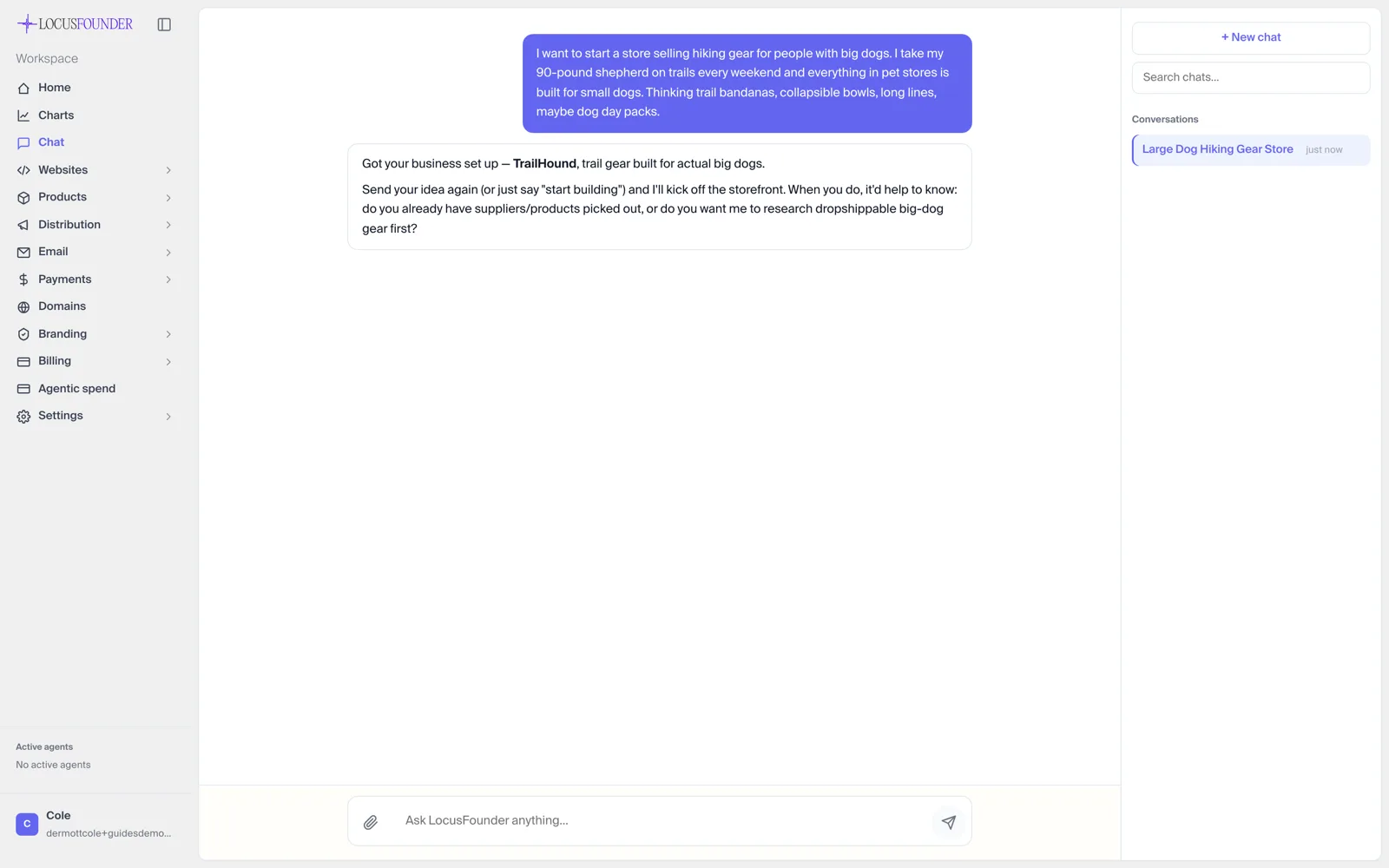 Artifact 1: the input is a plain-language concept for hiking gear for large dogs. The screenshot shows the actual product interface used in the walkthrough.
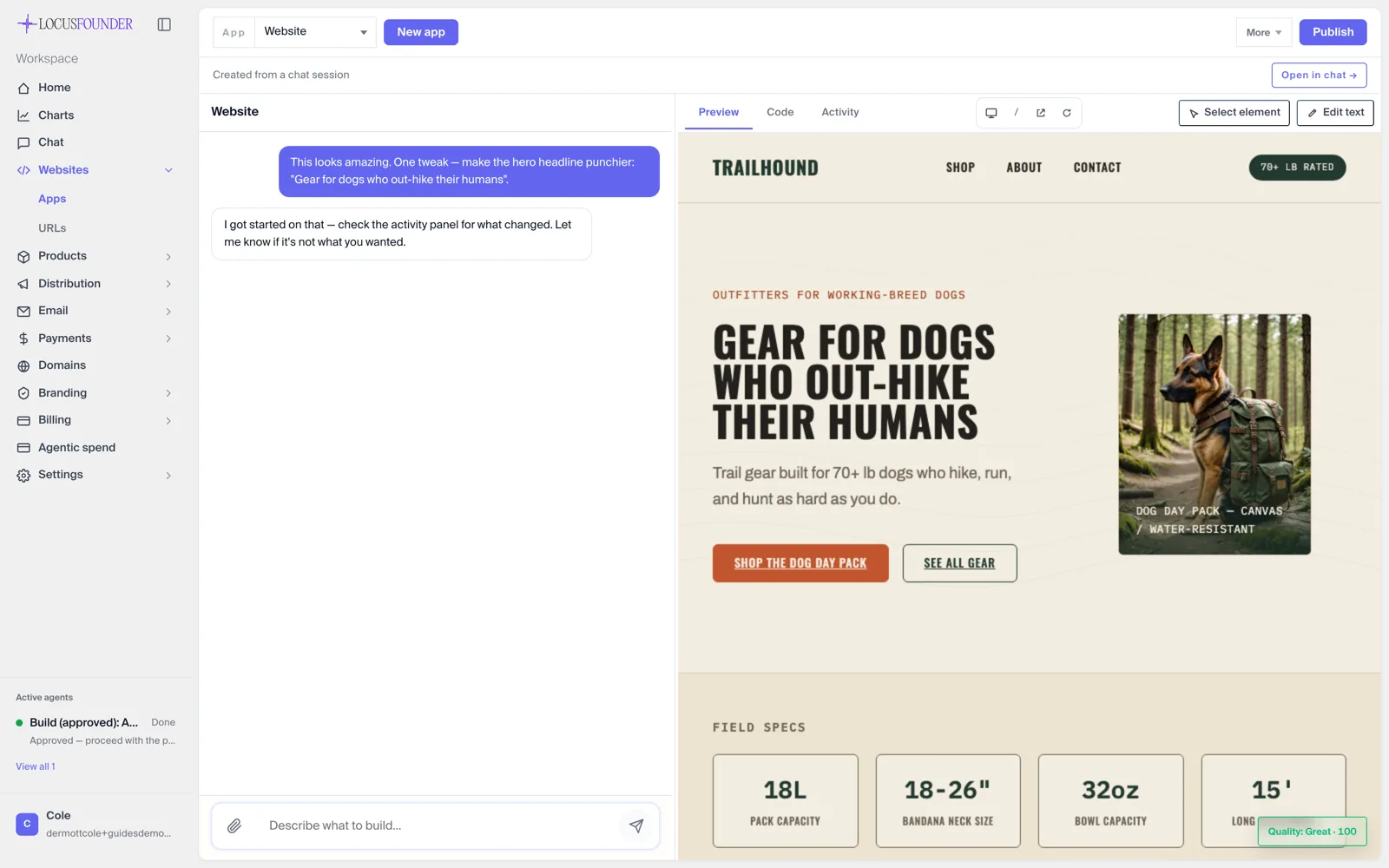 Artifact 2: a generated storefront preview beside the conversation used to request changes. This demonstrates the build-and-review loop, not market demand.
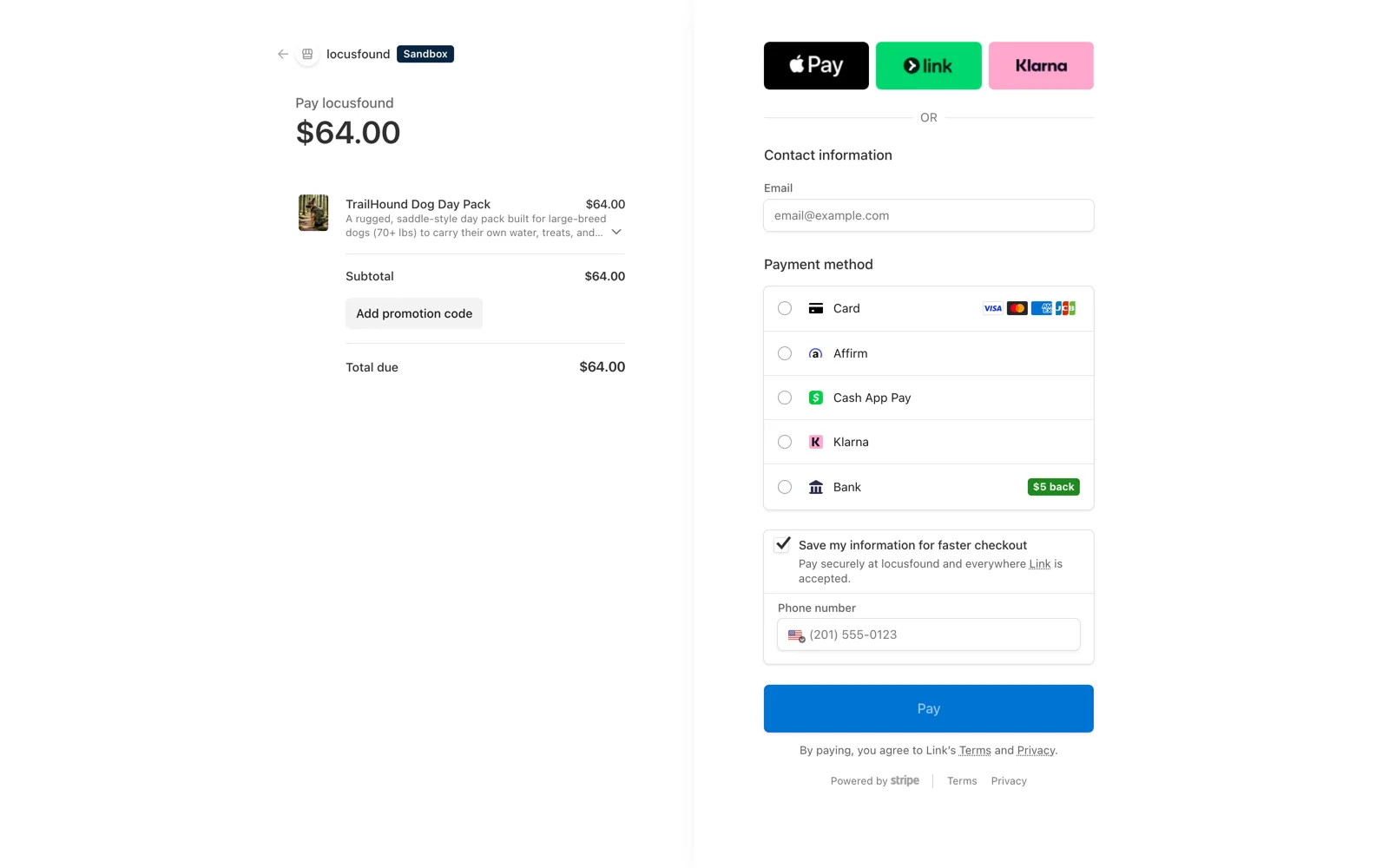 Artifact 3: a Stripe test checkout. It proves the demo flow reached checkout; it does not prove a customer purchase.
Video transcript (23 seconds): A silent product walkthrough opens on a demo workspace dashboard and daily briefing. It then shows a revenue-and-spend chart and lead pipeline containing illustrative demo data. The pointer inspects the chart before the view reaches the demo business card and recent agent activity. This is product evidence only; the displayed demo data is not a customer result.
Related guides
- Best AI website builders
- Best AI app builders
- Best no-code app builders
- Best no-code business builders
- Best AI cofounder tools
- Best Shopify alternatives
- How to sell digital products online
- How to build an AI agent
- AI dropshipping
- AI automation agency
FAQ
What is the cheapest way to start an internet business?
For many founders, a narrow service is the lowest-cash way to test demand because it requires no inventory and can be delivered manually. A one-page site or transparent digital presale can also keep fixed costs small. Use the calculator above and verify every provider's current official pricing because plan names, limits, and fees change.
Do I need to know how to code to start an AI business?
No. Tools like Lovable, Bolt, and Wix need no coding knowledge. Locus needs none either — you describe your idea in plain language and the agent handles the technical execution.
What is an AI business plan generator?
Most AI business plan generators (standalone tools or ChatGPT prompts) produce a document. Locus goes further: it uses the business plan to take action — building the site, running outreach, and testing the idea against real prospects. An AI business plan is only as useful as what happens after you read it.
How long does it take to get a first customer?
There is no responsible universal estimate. Time to a customer depends on the offer, audience access, price, trust, sales cycle, traffic quality, and execution. A site going live is not the same as demand. Set a 30-day evidence goal—such as a defined number of interviews, qualified conversations, proposals, or checkout attempts—and report the denominator even when the result is zero.
Ready to see what an AI cofounder can do in 24 hours? Start a free Locus workspace — no charge unless you decide to stay.
Method and change log
- Reviewer: Cole Dermott, founder and CEO of Locus
- Reviewed: July 13, 2026
- Evidence mode: first-party Locus product walkthrough plus desk research from linked official provider and U.S. government sources.
This guide is published by Locus and therefore has a conflict of interest. Categories are compared by the deliverable, work left for the founder, ownership, approval model, cost shape, and operating scope—not by an invented universal score. No third-party plan was purchased for this field guide, and it does not claim hands-on testing of those products. Third-party prices are intentionally omitted because plans change frequently. The TrailHound walkthrough is first-party product evidence and is explicitly not customer-outcome evidence.
- July 13, 2026: added the five-factor decision tree, four model-specific 30-day plans, U.S. primary-government sources, cost formula and calculators, AI/human boundaries, accountable review, repository-backed launch artifacts, a captioned video with transcript, and explicit evidence limitations.
- June 23, 2026: original AI-vs-DIY comparison published.